Showing posts with label PayPal. Show all posts

Thursday, 20 March 2014

How to Fix Error in PayPal during Payoneer Linking.

Fix Error in PayPal during Payoneer Linking


To withdraw your money from PayPal through Payoneer card it is necessary that you have added your Payoneer account to PayPal. But some people face problem to add their account because by adding payoneer account it shows error " We were unable to process your bank account registration at this time. We apologize for the inconvenience. Please try again at a later date " and they are unable to add their account.

I am here to sort out or fix it for you. Don't worry about it, It could be easily fixed. So follow my procedure to add your account without any error.


You have to go to your account in PayPal, In bottom you will see Contact Us. Click on it.


After clicking Contact Us you will be directed to another interface, Here you will have to click on Send Us below E-mail Us. As shown in the picture below.
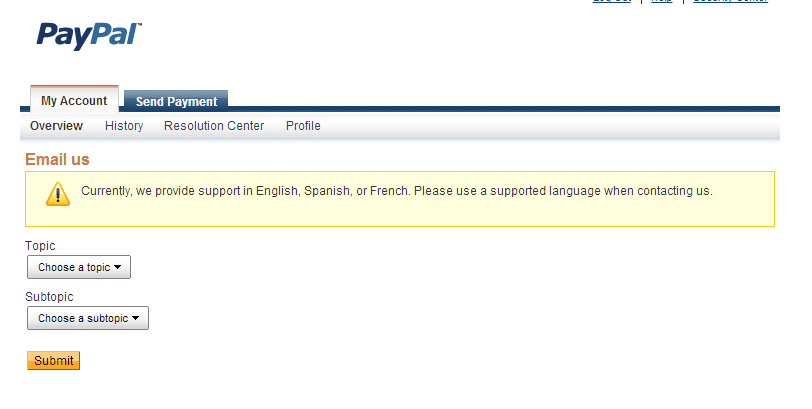


Now in this interface you will see two boxes, Here you will have to choose Topic and Sub Topic of your Problem, That where you facing problem, so choose these topics according to my picture. 

Topic : Bank Account/ Credit Card
Subtopic: Bank Account - Add/Remove/Edit.


Choose 1 and 2 according to my picture above.

3. Write down four last digits of your account which payoneer give you through in e-mail.
4. Write down Simple message that you are getting an error by adding your payoneer account to paypal, and also write down the message you getting.


After filling these boxes click on Submit.

After that will get automated message from paypal system. Like i given below.
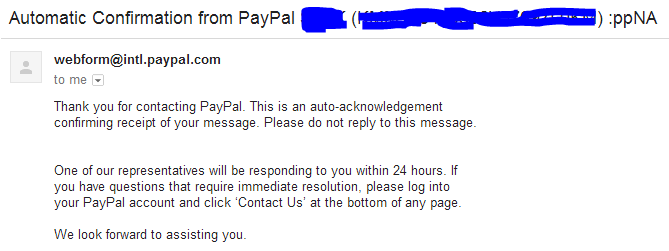


Then you will get another email from the paypal system, you will have to add your account of payoneer with in 4 hours after getting second email. 

This time your account will added successfully, Now enjoy your account and send and receive money...


Me : If you need more help, want to ask feel free to use below comment box. It will be my pleasure to help you. THANKS for reading.

Tuesday, 18 March 2014

How to Link Payoneer with PayPal.

To Add Payoneer with Paypal


Many countries where PayPal is not available, often they use to link their Payoneer Account which is available in most countries to withdraw their money from PayPal account through Payoneer Card.
For that Purpose you need PayPal and payoneer account, So make sure that you have these two accounts already. If not then see my post for creating account.

First you have to Login into your PayPal Account, Here you will see " Get Verified " Click on it.


Then a new Interface will open, Where they will ask for your choice to verify the account, and you have to click on bank for your verification through Payoneer. So don't click on Credit Card.

After clicking the Bank, Another Interface will open, Where you will have to check the " CHECKING " , avoid to click on saving.


Here you will see Routing number and Account Number. To Fill these boxes you need to login to your e-mail inbox and check Routing number and Account number in e-mail which is sent you by Payoneer. Note down these numbers and Put it in these boxes. Noe click on continue, After little process they will show you your bank name, you have to click it again. and then your account will add successfully. But in next 2 or 3 days they will send you small test amount  you will have to return it by putting these amount by clicking Get Verified >> confirmation.


Now you have done it successfully and you can enjoy with this service. If you facing Difficulties or getting Error message by adding your Bank Account so read my next post to fix the problem.


Me : If you need more help, want to ask feel free to use below comment box. It will be my pleasure to help you. THANKS for reading.

Sunday, 23 February 2014

How to get verified PayPal account in pakistan?

 Get verified PayPal account in pakistan


Many Pakistani earn money online but they don't know how to withdraw. There are alot of international corporations which pay you for different works. For example Freelancing, site reviewing, Pay Per Click and many more like this.These corporations may include Amazon, eBay and buySellAds etc. But now the problem for Pakistani Is to how withdraw their amount because all of these paying them through PayPal which is not available in Pakistan and some other regions. It is necessary to use PayPal in Pakistan because if you use another means to receive that money you will lose great part of your money. To avoid your loss we created guide for you to how withdraw your money in Pakistan through PayPal.


Getting Verified Paypal Account:


It is important to get a verified PayPal account because with out this you cannot withdraw your money.  So you will have to perform the following steps to get verified PayPal account and can easily withdraw your money.

Payoneer Account:


As you know that payoneer is famous money transferring service. To get PayPal account you must have verified payoneer account.  This is the most important step because Payoneer is available in Pakistan. So for PayPal we must first sign-up for payoneer.

So access Payoneer interface through your browser to sign up for a free account. Make sure you have your National ID card Scan copy, because they want any proof For Example Driving License, National ID card or something else. When you get verified by uploading your scan copy of ID card They will issue a Debit card to you. Which you will receive in approximately 20-40 days on your mailing address which you mentioned in the application from.

When your Master Card is approved, Payoneer will send you confirmation email and will ask you about your interest in US payment Service?  You must have to answer some wuestions and sign in.  When you replay their question through email they will review your details and will accept you for the Payment Service in few days.

After Signing up they will give you Viral US bank account number via email.

Now to get PayPal account, you will have to sign up and you will need US resident name and detail, So you can use fakenamegenerator.com for this purpose.

PayPal Account:


Now open paypal.com and sign up for an account but remember type United State in Country other wise you will not be able to get verified your account. Now fill Complete form with fake details that you have generated earlier in fakenamegenerator.com . Once you complete this process , Then verify your account.

Ok, now you  have to click on ‘Get Verified’. You will see two options there. You have to click on ‘Bank’  and fill the application form with details you received through email form Payoneer. Now PayPal will send Small test amount to you and you will have to return them this amount, Now you have  verified  account of PayPal.

PayPal Money Withdraw:


Now It is so simple to withdraw your amount from PayPal account,  you will have to transfer your money to your Payoneer account from PayPal account and then you can easily withdraw it from MCB through ATM. You can also Direct transfer you money to your Pakistani bank account.


ME: For any kind of question feel free to ask through below Comment box, I am here to replay you. THANKS


Search Engine Submission - AddMe url submit Casino us org Seo Packages http://blogsiteslist.com