Showing posts with label Blog Tricks. Show all posts

Thursday, 13 March 2014

How To Download and Change your Blog Template (Step By Step).

Download Template and Change Template of your Blog.


The most important thing for your blog is content, But to don't forget the importance of blog templates and the way your blog looks. The good and simple design will attract people attention and your visitors will be increase day by day. while the bad design of your blog will repel the visitors. Good template design also important for getting approved from advertising sites like Google Adsense, Chittika, Infolinks and many more like that. When you apply for registration with these advertising sites they will review your site design, contents, and visitors. So it is much important that your blog template is simple, clear and space available for advertising.


For that purpose i am going to show you how to choose Template design for your blog/site and how to customize the manu of that template. So lets start.


1) . Download Template:


Many websites gives free templates for blogger like bloggerthemes.net, hongkiat.com and templateism.com but I personaly advised you to download template from deluxetemplates.net. Here you will find good templates. Search for Template that have simple design having one side bar Menu bar and color near to white and download it. 

Here you will find many categories on lift side. Click on one according to your blog/site Title.


Select Template of your choice according to your Blog Title.


1. First take a look of that blog by clicking Demo.
2. If you like, then click on download to download that template for your blog.
3. choose where you want to save that template.
4. Start downloading.

Now extract the downloaded folder, you will find some files in that folder along with file one file having .xml extensions.


2) . Upload Template File:


Now go to your blogger Dashboard and click on Template you will see in right side up Backup/Restore, Click on it.


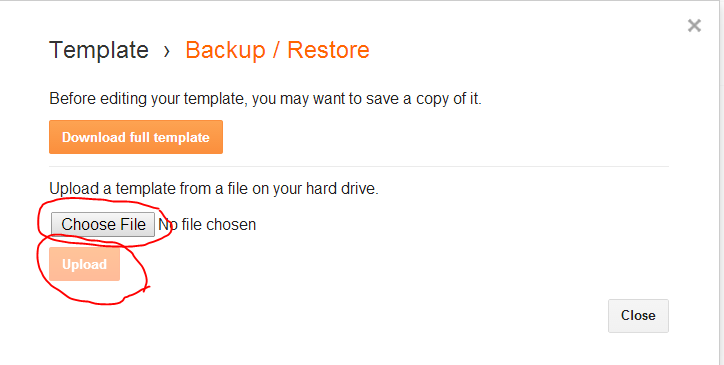
Now pop up window will open, Click on Choose File, and choose that .XML file where you saved it in downloading time. and then Click on Upload.


It  will take some time to upload and then it will return back to the Template Menu. 

Now you have changed your blog template, you can check it by visiting your blog.


Me : If you need more help, want to ask feel free to use below comment box. It will be my pleasure to help you. THANKS for reading.

Monday, 3 March 2014

How to put many posts in one page?

To put many post under one page


Many Bloggers face difficulties in putting one post under one and some even don't know how to do that, So I am going to guide you through this. so lets start.

If some one want to make menu and manage many posts so this techniques will help him a lot. For Example: if  you have Title " Blog " in menu and you have Hundred ( 100 ) posts and ten ( 10 ) are related to Blog and you want to put these Ten ( 10 ) post under Blog then follow my steps to do so.


First login into your Google account and then Go to Post section, Now you will see  your post if you have, If you have posts already then edit each one and give him label according to your menu, For example: If you have " Blog Tricks " in your menu and you want to put some posts under this title that people access these post simply by clicking this Title from menu, Then Change the Lable of each post to " Blog Tricks " which you want to appear under Blog Tricks. 


Give same Labels that you want to appear under one title.


Like Below


Now view one post and click on label below the post.


Now click on label below.


Now Copy URL from the upper site Box.


Now Go to your dashboard and goto Template and then click " EDIT HTML " , Now you will see your blog HTML code, Now press " Ctrl + F " and type Title, For Example: Blog Tricks and paste URL here.
and then click on " save template ". 


Now you have done, Now you Go to your blog and click on that title in menu you will be directed to page where you will see many posts that have same labels.


CONCLUSION :

                                Categorize your posts label vise, and the same Label posts will goes under one page.


Me : If you need more help, want to ask feel free to use below comment box. It will be my pleasure to help you. THANKS for reading.

Friday, 28 February 2014

How to Promote Your Blog and Get More Visitors?

promote your blog to get more and more Traffic.

Many peoples e-mail me and ask for traffic boosting, So i am going to write this post for you peoples that you read it and able to drive more and more traffic to your blog, and get profit. To drive traffic to your blog is not much easy task. So i m writing several steps for you to follow to increase your traffic, and I am confident that you will see changes in your blog traffic after these steps. By the way it will take 2 months to boost your traffic. So lets Start.


1). Create good Blog posts:


This is your number one task to begin. Write interesting blog posts. Your content may have some valuable informations for readers.

Make sure that your blog posts consist:

  • Valuable information that your blog readers may not know. Information should be up-to-date.
  • Help your readers to get success in some particular, For Example: How to get more traffic on your blog
  •  Your post must be well organized, Use bullets points, Also use outgoing links that will direct them to particular information on the specific topic.
  • Try to add some images and videos, Because peoples want some visuals.
  •  Share your own stories and news which will engaged the readers.
When you reached to 5 compelling posts or articles on your blog them start promoting your blog. If you don't have much information or posts on your blog your reader will read all the content and will leave to read your site.

Content is the most important part of the blog, If you don't have much contents readers will leave the  blog and will never return back to it, So write many posts fast in the beginning.

2). Announce on your social media profiles:


People have different accounts on different social media platforms, like Google+, Twitter, Linkedin, Facebook and many more. Make announcement on your profiles where you have many followers and tell them that you have start a blog with a title. First convince your friends and family members to join your blog and read.

 The first few readers will be your friends and family members, Tell them to read your posts and give you feedback for improvements.

3). favor from your close friends:


Ask your best friends to share your blog, By sending them  personal message. You can do all this on every social media platform like facebook, But i think e-mail is the best way to do so.

We have another option to find out people that are interested in your topic. Once you find people that are interesting in your blog will visit your blog and will read posts.

 Here i have have format that you can send to your friends to ask for share and read your posts.

Hi [Name]
I launched my new blog called [YOUR BLOG NAME] yesterday where I cover [YOUR TOPIC OR INDUSTRY]. I’m asking for a small favor to share the blog on your Facebook and Twitter feed. It won’t take much time and may be useful to your friends who are interested in blogging.
You can use the script below: “My friend [YOUR NAME] has started a new blog where he covers [YOUR BLOG TOPIC]. He publishes great content and useful tips. Feel free to have a look: YourBlog.com”
I appreciate your share very highly!
e-mail is the best way to let others know about your blog is a great way together, Using above format also ask for peoples to share your blog.

4)  Look for peoples who shared similar Topics to you:

Search on Google and find Similar topics to yours one, and look for comments there. If you are lucky then you will find his/her e-mail address by clicking their contact details in their profiles. 
Once you collect e-mails from different blogs and forms then send them e-mail with above format and wait that you may get response or not?
The second useful way is to reach people personally via twitter. Search and for keywords that are related to your blog topic. I will recommend you to use " WordPress Cheat Sheet". I personally also use it.
Ok, you will get many people by keyword search now click one by one and see if they usually share other posts or not, and reach them with 140 character. Keep in mind that spamming is not good, so beware of it, I know this is little much difficult but it is the best way to get more traffic to your blog. Don't beg for re-tweet your aim i to help people out there.
  This is the best way to gather more tweets toward your blog contents  which will lead you to get 1000/day traffic from twitter only.


5) Become Active in the Community:

Use different tools to find out important peoples in your industry or niche. Check their posts, add comments and become active.
ADD me friends i am getting bored of my studies. The easy way to find them is using Topsy. You have to Go To topsy website simply by clicking here. Then click on " influencers". Now pu keywords related to your blog.
Now click their Blog, tweets , Posts and add your comments and discussion. You may also use another tools for that purpose, I am mentioning some of them for you Tehnokratia, Klout, Twello and many more.
  The best and easiest way is to pot comments to popular posts. Keep in mind comment on new ones not on old articles and contents.
Connection will take much time but it totally worth in the long run. Keep your eyes on and re-tweet their updates and answer their questions.
It is hard to manage to build relationship with authorities in your niche. By doing this you will be explore and then you will become authority yourself.

6) Forums and Blogs participation:

Now I am introducing you to another great way to get more and more traffic from different sources, By discussions that are relevant to your's one. These are some step you should follow to get more traffic.
  1. Become active member on forums. Those forum which have more members will get you more traffic so try to start sharing your opinion on different threads and add your blog link in your signature. It will get you about 100-200 visitors per day which is not too much bad.
  2. Second is to become active member in blog posting, share your opinion on blog in comment box after reading the blog content similar to your's blog topic. Spamming is not good so avoid spamming and write some useful info that will attract visitors to your blog. also don't forget to insert your blog link.
It is not time consumable but will help you to get traffic to your blog, So must try it.

7) Getting Links and Google Optimization:

It is another way to get traffic is to make your blog Google friendly. In this case you will get much traffic through Google, Bing and yahoo which is the most popular search engines. But you will need to rank your blog in these search engines. It depends on many factors.
  1. Links to your blog from other blogs.
  2. Social shares and likes.
  3. and Good Contents.
To get more links share your blog links if people like it , They will share it further.
Google Optimization for your blog will surely drives more traffic to your blog.


Me : If you need more help, want to ask feel free to use below comment box. It will be my pleasure to help you. THANKS for reading. 


Sunday, 23 February 2014

How to move Contact form to separate page?

Move contact form to separate page


As you know, when you add Contact Form it displayed in sidebar. But you have people also seen many blogs which have contact form in separate page. Today I am going to show you that how can you do that. It is easy process to do but it needs little care.

First login to your blogger dashboard and click on layout. and click on one add gadget.


Another window will open, here you will have to click on 'more gadget' and then on 'contact form' and then click save.


Now click on pages in sidebar of your blogger dashboard which is shown in picture. then click on 'New Page' and then on Blank Page.


    Copy the below contact form code block
    <form name='contact-form'>
    <div>Your Name : </div>
    <input class='contact-form-name' id='ContactForm1_contact-form-name' name='name' size='30' type='text' value=''/>
    <div>Your Email: <em>(required)</em></div>
    <input class='contact-form-email' id='ContactForm1_contact-form-email' name='email' size='30' type='text' value=''/>
    <div>Your Message: <em>(required)</em></div>
    <textarea class='contact-form-email-message' id='ContactForm1_contact-form-email-message' name='email-message' rows='5'></textarea>
    <p></p>
    <input class='contact-form-button contact-form-button-submit' id='ContactForm1_contact-form-submit' type='button' value='Send'/>
    <div style='text-align: center; max-width: 450px; width: 100%'>
    <p class='contact-form-error-message' id='ContactForm1_contact-form-error-message'></p>
    <p class='contact-form-success-message' id='ContactForm1_contact-form-success-message'></p>
    </div>
    </form>
Now switch to the HTML of this page to paste the contact form code. Now paste the above HTML code in the post editor. disable the comments and publish your page.

1). Click on HTML.
2). Now paste the above code in the post editor.
3). Click on Option. and then mark " Don't Allow" in Reader Comment section.
4). Click on done to save options.
5). Now Publish your page.


Now go to Dashboard and click on Template and then click on "Edit HTML".


Now Click on "Jump to widget" and select "ContactForm 1" in drop down menu.


Now you will see HTML Coding like in below picture.


Now click on Black Triangle to expand.
you will see coding like that. and delete the highlighted code.


Delete the highlighted code and then click on save template. But keep in mind that not to delete widget from side bar. It will automatically disappear from your side bar. so please don't remove.

Your Contact form is shifted to separate page, enjoy happy blogging.

ME: Keep visiting my blog to learn more about blogging and customization. Feel free to ask any question in below comment box, I am here to answer and help you. THANKS


Thursday, 13 February 2014

9 Important tips to increase your visitors (2014)


 Tips to increase your visitors


It is much important in blogging to generate much traffic towards your blog to survive in World Wide Web. Every one try to adopt many ways and apply many tricks to increase blog visitors. The more Visitors will increase your earning from Google adsense and affiliate marketing. Earning with adsense is all upon your visitors so bloggers always work hard and hard to increase his visitors for his blog, that he may earn huge amount of money. A blogger want to work hard always, so if you want to generate more and more visitors for your blog here is many tips for you that will help you alot.


1). claim domain of blog:


Peoples make their blog but they don't care to claim the hosting and domain services of their blogs. One should claim their blog hosting with their own name. It is necessary to claim domain and hosting with your name for better ranking in Alexa. If you want better ranking for your site in Alexa. do this it is very simple and easy, you have to simply put Its meta tag inside you blog or site or uploading the HTML file they provide to you. and for domain name you can simply use Google Webmaster tools.

2). Quality Backlinks:


Backlinks plays important role in the world of blogs and websites. You can generate quality backlinks with different strategies such as guest article writing and forum posting etc. Once you develop quality backlinks for your bog you will get massive increase in your traffic/visitors .

3). Domain Name:


You must short, simple and related to your Blog domain that could be easily memories because the readers always prefer to short domain names, because it is then easy to type in search box. so make sure that you have short and simple domain name for your blog or website. Spelling mistake chances will be increase with the length of you domain name. So host your domain name short and simple.

4). Alexa Widgets:


To increase the chances of getting more visitors/traffic for your websites or for your blog, You will have to setup Alexa widget on you blog or website. Because Alexa collect and store the record of the hits and impressions which fall under its widget system. By this technique you will definitely improve ranking of your blog or website and will also increase the traffic.


5). Online Marketing:


With the help of online marketing you can spread your blog or website URL to every corner of the globe. By that way you will also know that who is your client and visitors.

6). Email Signature:


Peoples and visitors who visited your blog or website and contact you via email or contact us form are crazy about professional email signatures. Keep in mind when you give him respond, you will have to insert email signature to keep them occupied and tell them to visit your website again and again.


7). SEO Hiring:


It is impossible to generate traffic for your blog or website with out SEO (Search Engine Optimization). You will have to make sure that the person you hire for this job having that much experience to get your work done properly?.

8). Social Media:


One can make massive increase in his blog or website visitors with the help of social Media, Like Facebook, Twitter, Google+ and linked-in etc. If you really want Massive increase in your blog or site traffic you should keep your social media pages update on regular basis.

9). Forums:


In the forum Millions and billions of people takes part in the conversation on a daily basis. So this is a platform where you will interact with more and more peoples; Here you have great opportunity to direct much peoples toward your blog. Take part in communication between peoples insert your blog or site link and you will surely get massive traffic on your site.


ME: If you need more help and guidence feel free to post comment through below comment box, It will my pleasure to help you, Thanks for reading.

Tuesday, 11 February 2014

What is Blog and How to create Google ID?

What is Blog and How to create Google ID?


A blog is simple site which is published on World Wide Web (www) which is for discussion and information. Here you can share information or anything else by post which is displayed in reverse chronological order. One can also post videos and music in his post along with information.
       It is very simple to create a blog, but also keep in mind that you will need a google id to create new blog. So you will have to create Google ID first to start creating blog. After that you can create your blog. The blog templates available for free in many sites where you can download templates of your choice for your blog. In blogspot it is much easy to customize  your templates.


In the video tutorials we will show you the process to create and customize Blog step by step and in very simple language that any one that have no knowledge about blog will be able to create and customize blog. Here we will upload tutorials every day as soon as possible. so watch all tutorials from below playlist in sequence.


 In this video we tried to make it sample and easy with easy language (Urdu) that you people understand it easily. Watch all the videos and also share the links of this blog with your friends and other colleagues that he may also learn. In the next post we will tell you how to earn money with your blog and increase your traffic so please keep visiting the site and read all new posts.      You can also ask for any problem in below comment box, we will try to solve your problems.  


ME: If you need more help and guidence feel free to post comment through below comment box, It will my pleasure to help you, Thanks for reading.

 
Search Engine Submission - AddMe url submit Casino us org Seo Packages http://blogsiteslist.com